
LLP Registration Application Sent for Resubmission? How to Respond to FiLLiP Form Queries
23 Nov 2026 - Licenses
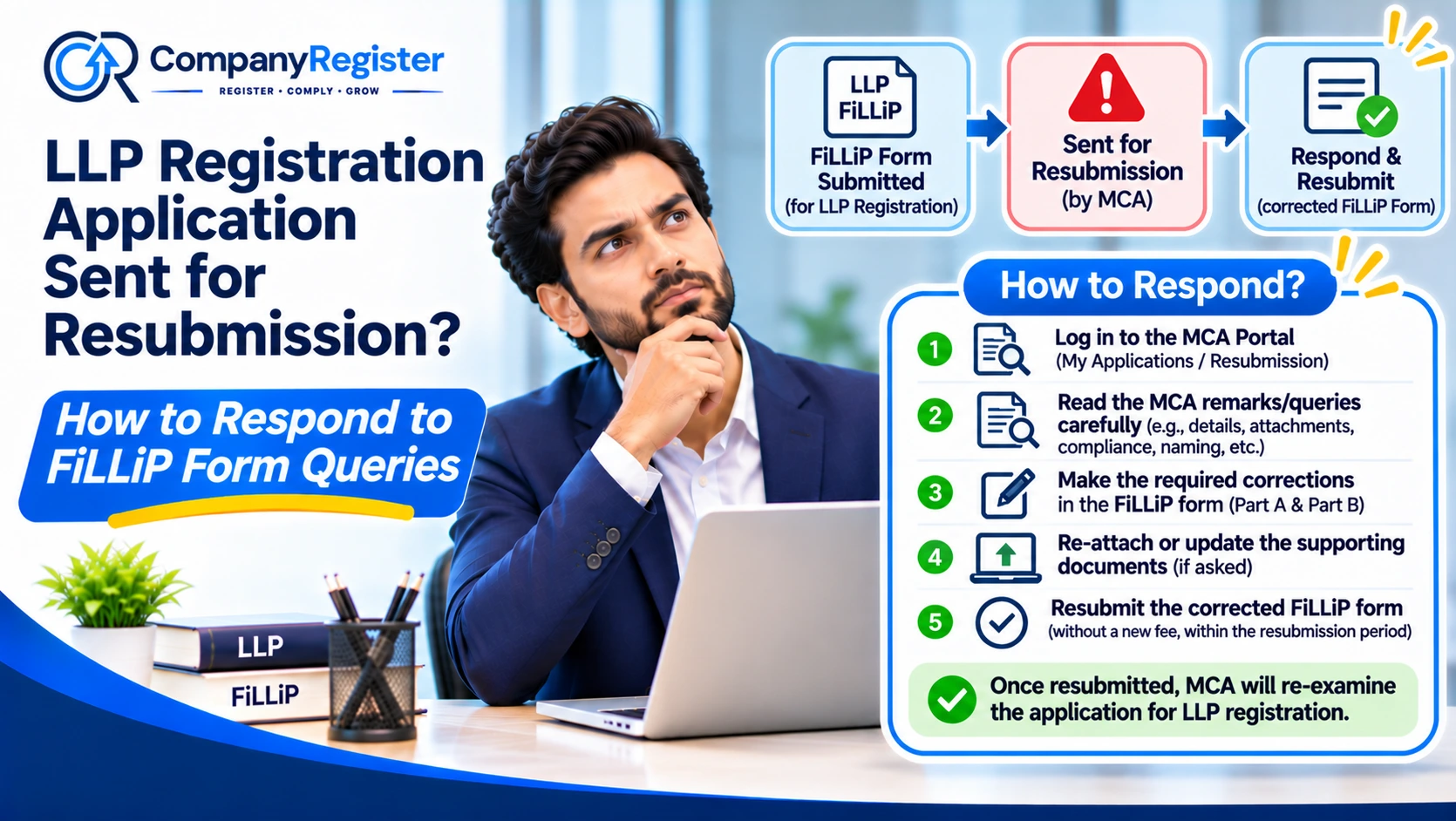
If your LLP FiLLiP application has been sent for resubmission, read each registrar remark, correct the relevant information or evidence, and submit the response through the available task on MCA21. A resubmission is an opportunity to address a query on the existing application; it is not itself an incorporation certificate.
Start with the original filing’s service request number (SRN), the actual remarks and the response window shown for your case. The right reply may be a corrected field, a replacement attachment, an explanation, or a combination of these. This guide separates those choices from the later review and registration stages.
1. LLP FiLLiP form resubmission: who can respond?
1.1 Read the application status first
A FiLLiP application returned for correction is different from one that is still under scrutiny. When a resubmission task is available, the person handling the filing can work on the registrar’s stated deficiencies through that task. An application merely showing scrutiny is awaiting review; do not assume that it has an open correction window.
A final rejection is a different outcome again. The rejected application may not offer the same route for correction, so read the decision and the options available on MCA21 before starting another filing. In particular, do not assume that uploading a new document elsewhere on the portal will reopen an application that has already been disposed of.
Identify the original FiLLiP SRN and the account used to manage the filing.
Read the status together with the complete registrar remarks, rather than relying on a status label alone.
Establish whether an active resubmission task is available for that application.
Make sure the people responsible for the proposed LLP can approve any substantive change.
Check that the required signatories are available for the filing actions the portal requests.
1.2 Check the proposed LLP still qualifies
The underlying incorporation conditions still matter during a correction. Under the Limited Liability Partnership Act, 2008, an LLP must have at least two partners. Section 7 also requires at least two designated partners who are individuals, with at least one resident in India as defined in that section. A query response cannot cure a structure that no longer meets the applicable requirements merely by changing a label in the form.
If a proposed partner withdraws, or the founders want to change the intended business structure, agree on the revised position before attempting a response. Whether a particular change can be made in the existing task depends on the application and the portal workflow; it should not be presumed from the fact that some fields are editable.
Founders can prepare a straightforward response themselves. A professional is particularly useful where a remark affects the proposed name, the legal status of a partner, or a declaration that requires an assessment beyond a clerical correction.
2. Documents to prepare for the query response
Gather the original filing pack before creating replacements. The registrar’s remarks determine which items need attention; a list of possible incorporation documents is not a direction to upload every item again. Keep originals and corrected versions separately so that the person signing can see exactly what has changed.
Original application and SRN: Use the filed copy or acknowledgement to identify the application and compare the submitted particulars with the requested correction.
Complete remarks or deficiency notice: Retain the portal text or notice in a readable form. It is the working record of what the registrar has asked the applicant to address.
Partner identity and address evidence: Keep the relevant supporting records for a partner whose particulars are queried. Supply a legible attachment in the format accepted by the relevant portal field when a replacement is required.
Registered-office evidence: Prepare the applicable proof of the proposed office address and any permission required for its use. These support the address stated in the incorporation application.
Subscriber and consent records: Keep the applicable subscriber sheet and partner consent materials with the filing pack. If a correction affects a declaration or consent, use the version required by the current workflow.
Entity authorisation, if applicable: Where a proposed partner is a body corporate, retain the relevant authorisation and nominee details supporting its participation.
Name or regulatory support, if applicable: Keep any relevant name reservation details, authorisation or approval when these form part of the registrar’s query.
2.1 FiLLiP Form 9 resubmission
Form 9 concerns consent to act as a partner or designated partner. If the remarks or the MCA workflow require a fresh or corrected consent, the people concerned need to review the details and complete the signing actions requested for that version. Do not assume that an earlier consent automatically covers a changed person or changed particulars.
Conversely, a Form 9 reference in an incorporation pack does not establish that every resubmission requires every consent to be recreated. Follow the task and the applicable form instructions. Preserve the final submitted version alongside the response record, rather than keeping only an unsigned working copy.
For an MCA FiLLiP document correction, use the portal’s current attachment and signing instructions for the particular field. A clear scan is useful only if the correct document has been attached in the place where the reviewer can associate it with the query.
3. FiLLiP resubmission process: preparation to submission
3.1 Prepare a remark-by-remark response
Begin with a simple working table outside the portal: one row for each remark, the relevant form field or attachment, the proposed action, and the person responsible. This makes it easier to spot a query that needs a founder’s decision rather than a typographical edit. Keep the registrar’s wording intact in your working record, even if you use a shorter description internally.
For each row, decide whether the response is a change to information, supporting evidence, an explanation, or more than one of these. Where the portal provides a response field, use a direct answer: identify the point raised, state what was changed or supplied, and refer to the relevant attachment if appropriate. Avoid an explanation that promises a correction without actually making it.
3.2 Submit through MCA21
Sign in to MCA21 using the account that can access the existing filing. Locate the application using its SRN and open the available resubmission task.
Read all displayed remarks and instructions.
Match them against the working table, including any directions about the response field, attachments or signing.
Make the permitted corrections in the relevant fields and add or replace evidence as the task allows.
Review the whole response for consistency before moving to submission.
Complete the portal’s validation and signing sequence.
If the workflow generates a PDF for digital signing, use the generated version and upload the signed file as instructed for that task.
Finish any remaining portal actions, including payment if the portal requires it for the chosen action.
Record the acknowledgement, status and SRN associated with the completed submission.
Use the existing task rather than beginning a fresh incorporation filing simply because corrections are needed. If the task does not permit the change requested, keep a record of the restriction and seek clarification through the portal’s support route or appropriate professional assistance. A second application can create a separate filing trail without resolving the first one.
3.3 Record the outcome
After submitting, save the acknowledgement and a copy of the final response, not just the draft used to prepare it. Record the submission date and the status shown immediately afterwards. The filing team should also know who will monitor the application, particularly where an adviser submitted it on the founders’ behalf.
A completed upload and a completed filing action are not always the same event. Follow the task through to the portal’s acknowledgement and inspect the resulting status. If an action remains pending, resolve that pending step before treating the LLP incorporation query response as delivered.
4. Government fees and professional costs
The cost of resolving a query depends on the action actually needed. An incorporation filing charge, a portal charge shown for a subsequent action, document-related expenses and an adviser’s fee are different items. The supplied information does not establish a universal government amount for every resubmission, so an amount should not be assumed from the original filing fee.
Cost item | What to ask or inspect |
|---|---|
Original government filing fee | Identify what was paid for the original application and retain its receipt. |
Charge shown for the current portal action | Read the amount and purpose, if any, displayed before completing that action. |
Fresh application or name-related charge | Establish whether a separate filing is actually needed and price that filing separately. |
Professional fee | Ask whether reviewing remarks, revising documents, signing coordination and further queries are included. |
Supporting expenses | Ask about document preparation, applicable stamp duty, taxes and other third-party costs separately. |
4.1 Ask for a written scope
If you engage an adviser, share the actual remarks before accepting a quote. A price for a simple attachment replacement may not cover a substantive name issue or a changed partner structure. Ask whether the quoted amount covers one response only, any later follow-up, and the work needed if the existing application cannot continue.
For a government fee for LLP registration, distinguish the original incorporation fee from any amount the portal presents for the action you are about to take. Do not make a duplicate payment merely because the application is under review. Keep payment evidence with the application records and resolve any payment-status discrepancy before paying again.
5. Deadline and processing timeline
5.1 Response window
The FiLLiP resubmission deadline is the time available to act on the registrar’s query; it is not the date by which the LLP is guaranteed to be incorporated. Read the notice and the deadline or instructions displayed for the specific task. The available evidence for this guide does not establish a current universal number of days, so no fixed response period is assumed here.
Allow time for the people who control the information and signatures to review the response. A founder may be able to correct a field quickly, while a consent, authorisation or third-party document can take longer to obtain. Treat the full response as the unit of work: an incomplete response submitted early may still leave a material remark unanswered.
5.2 After submission
Once the response is acknowledged, the application returns to the review stage reflected on the portal. The elapsed time can vary with the nature of the query, the completeness of the response, the registrar’s review and any further communication. There is no reliable current processing benchmark in the supplied evidence for this particular correction stage.
Set an internal date to look for a status update and keep that responsibility with one person. If the displayed status appears inconsistent with the acknowledgement or a technical issue blocks the task, preserve the relevant screen details and use the MCA support route. A pending review should not be represented to banks, customers or partners as a completed registration.
6. Common query causes and how to correct them
The strongest LLP registration objection reply deals with the reason for the query, not merely the visible symptom. Use the cause-and-correction list below to decide what the reviewer needs to see.
Partner details do not align: A name, date or address in the form may differ from the supporting record. Compare the actual source records, establish the correct particulars with the person concerned, and make the permitted correction with matching evidence. Do not alter an official record merely to make an unsupported form entry look consistent.
Office evidence does not establish the stated address or permission: The reviewer needs to connect the proposed address with its supporting evidence and any applicable permission. Obtain evidence that supports the actual office arrangement; if the arrangement itself has changed, assess the effect on the application before responding.
An attachment is unclear or incomplete: Missing pages, unreadable scans or an attachment placed against the wrong description make review difficult. Prepare a complete, legible replacement and identify it accurately in the response. Preserve the original source document.
A name is questioned: Read the precise objection before drafting an LLP name objection reply. A query about similarity, use of a particular word or supporting authority calls for different evidence or a different decision. An explanation alone should not assert a right to use a name that the applicant cannot support.
Consent or authorisation does not match the proposed arrangement: Check whose consent or authority is being relied on and what it covers. If the substantive arrangement has changed, obtain the appropriate approval and use the applicable current form or document rather than changing a signature page in isolation.
A portal or signing step fails: A technical failure is not necessarily a registrar objection. Capture the error, the SRN, the action attempted and the time; distinguish an unfinished task from one already acknowledged before retrying or escalating it.
Do not use a resubmission to make unrelated substantive changes without considering their effect on the rest of the application. A change that appears in one field may also affect the evidence or declarations on which the filing relies.
7. What changes after the LLP is registered
7.1 Save the incorporation record
When incorporation is approved, obtain and retain the LLP registration certificate and the final incorporation records. Check the certificate against the intended legal name and the details needed for the LLP’s records. Keep the SRN, final application, supporting papers and approval together so that the founders can reconstruct the filing later.
Share the approved particulars with the people responsible for banking, contracts and accounts. A proposed name or an application acknowledgement is not a substitute for the registered particulars when another party asks for incorporation evidence.
7.2 Move to the LLP agreement and ongoing records
Section 23 of the LLP Act deals with the LLP agreement and its filing. Form 3 is the MCA form associated with information about the agreement. Arrange the agreement and its filing as a separate post-incorporation task; the FiLLiP query response does not complete that work.
Assign responsibility for maintaining the LLP’s records and tracking its recurring filing obligations. Sections 34 and 35 of the LLP Act address accounts and annual returns respectively. The applicable filing requirements and due dates belong in the LLP’s compliance calendar, rather than being left with the person who handled only the incorporation query.
8. Your next three actions
Open the existing SRN and decide whether there is an active correction task, a pending review, or a final decision. Use the actual notice to identify the action available.
Give each remark an owner and a proposed correction. If the response is limited to a clear clerical issue and you can complete the portal actions, prepare it yourself; obtain targeted help for a disputed name, a changed structure or a declaration you cannot confidently resolve.
Choose who will submit and monitor the response. If you prefer support across the filing, Company Register offers LLP Registration assistance. Begin the process online via the official government portal, or engage Company Register for end-to-end assistance
Need personalised advice for your business?
Share your query and our compliance team will connect with you shortly.
Frequently Asked Questions
Does resubmission mean my LLP application has been rejected?
Where can I find the FiLLiP resubmission remarks?
What is the FiLLiP resubmission deadline?
Do I need to replace every incorporation document?
Does Form 9 always need to be signed again?
Is there a fixed government fee for every FiLLiP resubmission?
Can I change an LLP name in a resubmission?
What should I do if the portal does not show a resubmission task?
Recent Blogs
 23 Nov 2026 - Licenses
One Partner Has Left Your LLP: What Should You Do If Only One Partner Remains?
Find the partner-change deadlines, Form 3 and Form 4 steps, documents, costs and personal-liability rules when one LLP partner remains.
 23 Nov 2026 - Licenses
LLP Registered but LLP Agreement Not Filed? What to Do About Form 3
Identify an unfiled LLP agreement, prepare Form 3 on MCA21, separate filing costs from stamp duty and track the submission.
 23 Nov 2026 - Licenses
DSC Not Associated With the MCA Portal? How to Fix the Problem Before Company Registration
Identify the MCA DSC association error, prepare signatory details, follow the portal workflow and distinguish certificate costs from incorporation fees.